



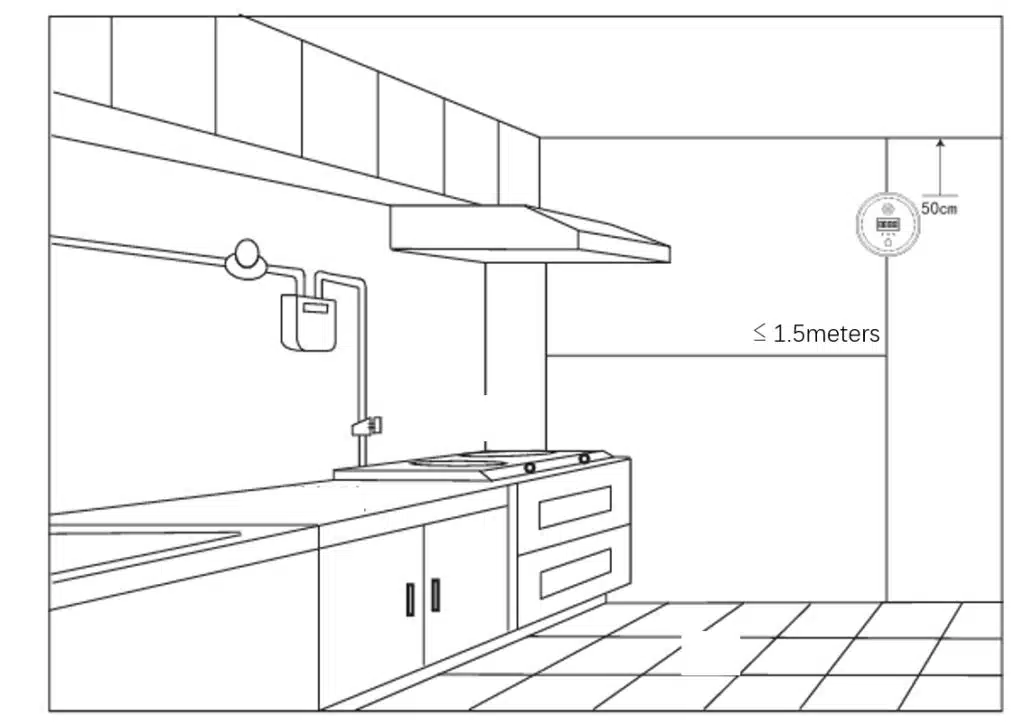
1. This product should be installed within 1.5 meters of the gas source. – a. When detecting gases lighter than air: Install it no less than 0.5 meters below the ceiling. – b. Fix the installation base plate to the wall with screws, hang the detector, and plug in the power supply.
2. Installation precautions: The installation location should not be too close to the gas-fired stove, to prevent the detector from being baked by the stove fire. Do not install it in places with heavy fumes, to avoid false alarms or poor air flow through the detector’s air inlet, which may affect the detector’s sensitivity. Also, do not install it near exhaust fans, doors, and windows, or in areas with high humidity like bathrooms.
3. Connect the wires correctly according to the left-hand diagram. All wiring installations must comply with national and local effective regulations and standards. Select wires with appropriate core thickness. The wires connecting the probe and auxiliary devices should have color markings to avoid wrong connections. Incorrect wiring will cause the probe to malfunction.
4. According to the requirements shown in the picture, install the corresponding functional SIM card in the SIM card slot (for NB-IoT version products, an NB-IoT IoT card needs to be installed; for Cat.1 version products, a Cat.1 IoT card needs to be installed).
5. As shown in the picture, set the product output mode jumper. Short-circuiting the jumper is the normally closed state, and removing the jumper is the normally open state.
6. Connect the power supply. The circuit enters the preheating state. All indicator lights turn on once, and then the green indicator light stays on, entering the preheating state.
7. The preheating generally takes 3 minutes. During the preheating process, the device will perform self-checks on the sensor, SIM card, and platform communication. After the preheating is completed, the indicator lights will show the self-check results. During the preheating process, the digital tube displays a 180-second countdown.
| Self-check Results | Problem Causes | Abnormality Handling |
| The yellow light stays on, buzzer keeps sounding | Sensor lifespan expired | Contact the supplier |
| Yellow light flashes, buzzer keeps sounding | Sensor malfunction | Contact the supplier |
| The green light flashes once, lasts for 60 seconds | Self-check successful, signal strength < 5, extremely poor | Find out the reasons for the poor signal |
| The green light flashes twice, then flashes three times | Self-check successful, signal strength 5 – 10, poor | Find out the reasons for the poor signal |
| The green light flashes three times, then flashes three times | Self-check successful, signal strength 11 – 16, average | Find out the reasons for the poor signal |
| Green light flashes four times, then flashes three times | Self-check successful, signal strength > 16, good | – |
| Red light flashes once, lasts for 60 seconds | Communication failure, communication hardware malfunction | Contact the supplier |
| Red light flashes twice, lasts for 60 seconds | Communication failure, SIM card malfunction | Check whether the SIM card is inserted in the wrong direction, whether it has expired, whether it is activated, and whether it has been bound to other devices |
| Red light flashes three times, lasts for 60 seconds | Communication failure, no signal | Check whether there is NB-IoT/Cat.1 signal locally. If it is confirmed that there is a signal locally, return the device to the factory for repair |
| Red light flashes four times, lasts for 60 seconds | Communication failure: The device has not been added to the telecom platform | Check whether the device IMEI is registered on the alarm platform. If it is already registered, contact the business personnel and arrange technical handling |