
Description
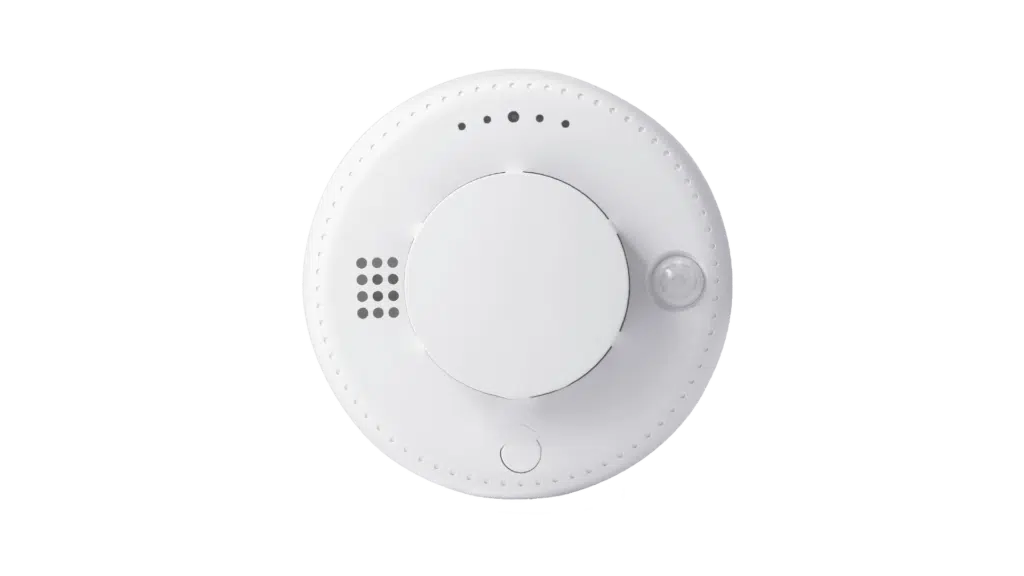
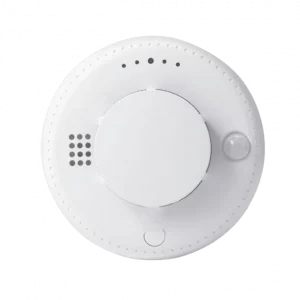
This is multi-functional smoke detector features smoke, temperature, and infrared sensors. It can
detect early fire hazards, with sensitive smoke sensors and accurate temperature monitoring. The
infrared sensor adds extra protection. You can remotely monitor it via an app for instant alerts. It
integrates with smart home systems for a coordinated response. Easy to install, it offers enhanced
fire safety and peace of mind
| Parameter | Specification |
|---|---|
| Communication Method | Cat.1 |
| Battery Voltage | DC 3V |
| Operating Current | NB-IoT: ≤200mA / Cat.1: ≤460mA |
| Operating Temperature | -20°C to +55°C |
| Dimensions | Φ105 × 51.3 mm |
| Alarm Temperature | >57°C or >7°C/min (rapid rise) |
| Low Voltage Alarm | DC 2.7V |
| Battery Type | Polymer lithium battery |
| Standby Current | ≤10μA (with human motion detection disabled) |
| Humidity Resistance | ≤95% RH |
| Installation Method | Ceiling-mounted |
| Alarm Triggers | Smoke alarm, temperature alarm, rapid temperature rise alarm, tamper alarm, human motion detection alarm (optional) |
Step | Description |
1. Register Product IMEI on Cloud Platform | Register the product IMEI code on the IoT platform, APP, or PC management interface by scanning the QR code or manually entering the IMEI code. Add the device to the IoT platform. Different platforms may have different procedures. |
2. Product Communication Self Check | / |
(1) Install SIM Card | Insert the SIM card (nano) according to the product diagram, paying attention to the orientation. |
(2) Power On | Remove the battery insulation tab or install the battery |
(3) Self-Check | The product enters self-check mode based on user requirements. The red light turns on, indicating power-on, followed by a steady green light as the product performs internal self-check. |
(4) Signal Strength Indication | If the product and communication are normal, it enters signal strength indication mode with four levels: – Poor signal: Yellow light flashes for 1 minute. – Average signal: Green light flashes twice, repeated 3 times – Good signal: Green light flashes 3 times, repeated 3 times – Excellent signal: Green light flashes 4 times, repeated 3 times. Install the product in a location with a strong signal for optimal performance. |
(5) Self-Check Errors | If issues are detected, the red light flashes continuously for 60 seconds: – 1 flash: Module failure – 2 flashes: SIM card issue (e.g., no balance, binding problem, poor contact). – 3 flashes: Connection failure with carrier base station (no internet). – 4 flashes: Communication failure with carrier service platform (e.g., configuration error). |
3. Operation Instructions | |
(1) Standby Mode | After self-check, the product enters standby mode. The green light flashes once every 50 seconds. |
(2) Low Battery Warning | In standby mode, if the battery is low, the green light flashes, and the buzzer sounds once. |
(3) Fault Alarm | If a sensor fault or aging is detected, the central red light flashes once per second, and the buzzer sounds once. |
(4) Smoke Alarm | When the smoke concentration reaches the threshold: – Central red light flashes continuously, and the buzzer sounds. – Higher concentration: Middle 3 red lights flash continuously. – Further increase: All 6 red lights flash continuously. |
(5) Temperature Alarm | The alarm triggers when the temperature exceeds 5°C or rises by 7°C within 7 minutes. The central red light flashes continuously, and the buzzer sounds. |
(6) Mute Function | Press the mute button to silence the buzzer; the red light flashes twice per second. If the alarm condition persists, mute lasts up to 30 seconds before the buzzer reactivates. The alarm resumes if conditions persist. |
(7) Human Motion Detection (Optional) | When enabled, it detects movement below the product. The central red light flashes for 1 second. Does not interfere with other alarms. |
(8) Test Button | In standby mode, press and hold the test button for rapid LED flashing and buzzer activation. Holding for over 5 seconds simulates an alarm report to the platform. |
4. On-Site Installation | |
(1) Mounting Bracket | Secure the bracket to the ceiling with screws (indoor use only; avoid outdoor, high-light, dusty, oily, or humid environments. Contact the company for specialized detectors if needed). |
(2) Install Alarm | Rotate the alarm onto the bracket. Improper battery installation will prevent mounting. |
(3) Test | Press and hold the test button to disable alarms. Green light flashes once, indicating successful communication. Check the platform for battery voltage and signal strength. A poor signal may cause a power drain or a temporary communication failure. |
(4) Troubleshooting | If unactivated, perform a communication self-check via phone and resolve issues based on LED indicators. |
(5) Low Battery Alert | Notifies the cloud platform when the battery is low, prompting replacement. |
5. Extended Human Motion Detection (Optional) | |
Overview | Detects movement within a 6-meter diameter below the product. Four modes: |
(1) Disabled | Human motion detection is off. |
(2) Alarm Lock Mode | Activates during smoke/temperature alarms after a 1- minute warm-up. Reports detected movement on the platform at 1-minute intervals. |
(3) Regular Alarm Mode | After a 1-minute warm-up, it defaults to 5-minute test mode (1-minute intervals). Post-test follows platform-set intervals. |
(4) Custom Alarm Mode | Post-warm-up and test mode, reports “no activity” if no movement is detected within the set time; reports “activity” upon detection. Note: This feature increases power consumption and is disabled by default (enable via platform). |
Feature | Basic Version | Professional Version | Premium Edition | Enterprise Customized |
Platform Software Pricing | 19,800 yuan | 39,800 yuan | 69,800 yuan | Negotiable |
Upgrade Subscription Fee (per year) | / | 6000 yuan | 9000 yuan | / |
Smart Linkx IoT Mini Station (Optional) | 5980 yuan | 7980 yuan | 9980 yuan | / |
Core License | ||||
Number of Connected Devices (units) | 500 | 5000 | Unlimited* | Custom |
Independent Deployment | ✓ | ✓ | ✓ | ✓ |
White Label | ✓ | ✓ | ✓ | ✓ |
Functional Modules | ||||
Supports Carrier Equipment Connectivity (China Telecom AEP / China Mobile OneNet) | ✓ | ✓ | ✓ | ✓ |
Platform API Standard Interface | ✓ | ✓ | ✓ | ✓ |
Monitoring Alarm Display Screen | ✓ | ✓ | ✓ | ✓ |
Map Location Display | ◯ | ✓ | ✓ | ✓ |
Operation & Maintenance Monitoring and Management | ✓ | ✓ | ✓ | ✓ |
Professional Analysis Reports and Statistics | ◯ | ✓ | ✓ | ✓ |
WeChat Mini Program | ◯ | ✓ | ✓ | ✓ |
Notification Gateway | ✓ | ✓ | ✓ | ✓ |
Cockpit Instrument Panel | ◯ | ✓ | ✓ | ✓ |
Supports FOTA Upgrades | ✓ | ✓ | ✓ | ✓ |
Data Downlink Command Management | ✓ | ✓ | ✓ | ✓ |
IoT SIM Card Management | ◯ | ✓ | ✓ | ✓ |
User Hierarchy Management | ✓ | ✓ | ✓ | ✓ |
Direct Connection Gateway | ◯ | ◯ | ✓ | ✓ |
Service and Support | ||||
Deployment Support | Standard Deployment Documentation | Remote Assisted Deployment | Expert 1-on-1 Deployment | Custom Deployment |
Software Feature Updates & Upgrades | ◯ | ✓ | ✓ | ✓ |
Free Hardware Integration (Model) | ◯ | 2 Models | 2 Models | 2 Models |
Free Online Guidance | ✓ | ✓ | ✓ | ✓ |
SLA Service | ◯ | ◯ | ✓ | ✓ |
Reviews
There are no reviews yet.