Description
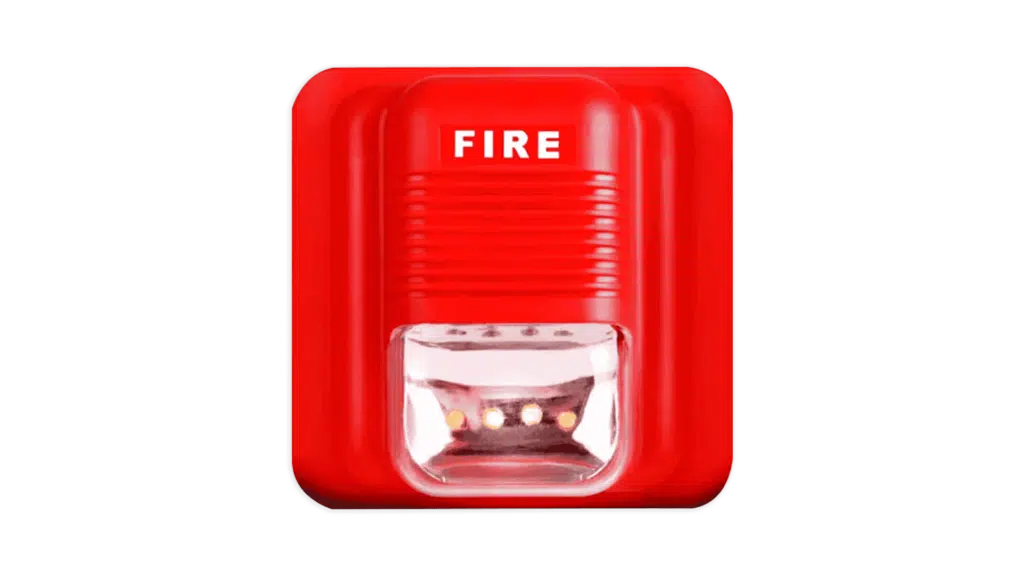
Wireless Sound and Light Alarm
This product emits sound and light signals for alarm purposes. It supports remote control and linked alarms, and can be equipped with multiple remote controls and detector accessories. It features strong anti-interference capabilities, false alarm prevention, and missed alarm prevention.
It is suitable for schools, homes, shops, supermarkets, malls, warehouses, factories, hotels, apartments, and other environments. The device transmits event information and sets device parameters via a 4G Cat.1 wireless network.
Main Functions
-
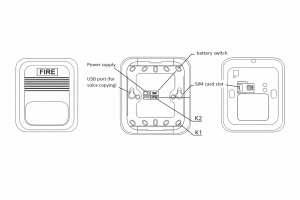
Alarm prompt voices can be selected, and customer-specific voices can be copied to the device via USB.
-
Alarm duration and volume level are configurable, with remote configuration available for greater flexibility.
-
Capable of learning and pairing with remote controls, detectors, and other accessories.
-
Alarm modes: Platform, WeChat, phone call, SMS.
-
Self-check function: Indicates various operating statuses of the product.
-
Signal fault indication to the operation center.
-
Local and remote signal strength indication.
Indicator Status Table
| Indicator Status | Meaning | Troubleshooting |
|---|---|---|
| Indicator 1 flashes 1 time, lasts 60s | Successful communication, signal strength ≤5 (extremely poor) | Investigate causes of poor signal |
| Indicator 3 flashes 2 times, 3 cycles | Successful communication, signal strength 5–10 (poor) | – |
| Indicator 3 flashes 3 times, 3 cycles | Successful communication, signal strength 11–16 (average) | – |
| Indicator 3 flashes 4 times, 3 cycles | Successful communication, signal strength >16 (good) | – |
| Indicator 2 flashes 1 time, lasts 60s | Communication failed, hardware fault | Check power supply, etc. |
| Indicator 2 flashes 2 times, lasts 60s | Communication failed, SIM card fault | Check SIM card insertion, validity, activation, and binding status |
| Indicator 2 flashes 3 times, lasts 60s | Communication failed, no signal | Check local network coverage |
| Indicator 2 flashes 4 times, lasts 60s | Communication failed, device not added to platform | – |
| Indicator 2 flashes 1 time | Alarm or alarm recovery event occurred | – |
| Indicator 3 flashes 1 time | Data successfully reported to cloud platform | – |
Installation and Operation Instructions
I. Installation Guide
-
Fix the product with 2 screws.
-
Install the device as close to the center of the protected area as possible.
-
Choose a location with good network signal quality to ensure optimal reception of all wireless detector accessories and stable communication.
-
Avoid large metal objects, high-frequency interference appliances/equipment, and shielding objects such as reinforced concrete walls and fire doors.
II. Operation Guide
1. Power-On Initialization and Self-Check
-
After connecting power:
-
All lights flash once.
-
Indicator 2 flashes once.
-
Indicator 3 stays on.
-
Voice prompt: “Device powered on, connecting to network.”
The device enters initialization, self-check, and network connection processes.
-
If device and IOT network communication are normal:
-
Indicator 3 flashes to display signal strength.
-
Voice broadcasts the signal quality (refer to the Status Display Comparison Table).
-
If a self-check issue is detected:
-
Indicator 2 flashes to enter fault display mode.
-
Voice broadcasts specific fault details (refer to the Status Display Comparison Table).
-
After successfully accessing the cloud platform:
-
Indicators turn off.
-
Device enters normal operation.
2. Device Parameter Setting
Parameters can be set via buttons after installation and self-check.
Alarm Voice Switching
-
Press the K2 button to switch alarm voices.
-
Each press switches to the next voice.
-
Indicator 1 flashes once.
-
The selected voice content is broadcast (depending on USB-copied files or factory-default voices).
Enter Setting Mode via K1 Button
Press K1 to switch parameters in the following order:
Alarm Time Setting → Volume Setting → Remote Control Code Learning → Detector Code Learning → Delete Remote Controls → Delete Detectors → Exit Setting Mode.
The corresponding function indicator lights up with voice prompts during setting.
Alarm Time Setting
Set alarm duration:
-
1 minute
-
5 minutes
-
15 minutes
-
30 minutes
Press K2 to switch options.
Volume Setting
Set alarm volume:
-
Mute
-
Low
-
Medium
-
High
Press K2 to switch options.
Remote Control Code Learning
-
Press any button on the remote control.
-
Voice prompt: “Code learning successful.”
-
If already learned: “Relearning code.”
Detector Code Learning
-
Trigger the detector accessory to send a wireless signal.
-
Voice prompt: “Code learning successful.”
-
If already learned: “Relearning code.”
Delete Remote Controls
-
Press K2 to delete all learned remote controls.
-
Voice prompt: “Deletion successful.”
Delete Detectors
-
Press K2 to delete all learned detectors.
-
Voice prompt: “Deletion successful.”
-
The device automatically exits setting mode after 30 seconds of inactivity.
-
Note: Parameters set in K1 mode are saved only after exiting the setting mode.
3. Platform Parameter Setting and Control
Some parameters can be remotely configured via the platform (items may vary by platform):
-
Remote control of alarm on/off (sound and light prompts)
-
Alarm time setting (1 / 5 / 15 / 30 minutes)
-
Volume setting (Mute / Low / Medium / High)
4. Function Testing
Trigger alarms via:
-
Remote control
-
Detector accessories
-
Platform commands
-
Platform device linkage
5. Voice File Copying
-
Connect the device to a computer using a USB data cable.
-
The computer automatically installs drivers and displays a USB drive.
-
A-prefixed files are system voices (non-deletable).
-
B-prefixed files are alarm voices (deletable and replaceable).
-
Copy alarm voice files to the device.
-
Eject the USB drive safely.
-
Power cycle the device for changes to take effect.
Reviews
There are no reviews yet.